First introduced in the mid 80s; the first UK call was made from Trafalgar Square.... it was on the Racall Vodafone network. Now just Vodafone.
We've all seen pictures of the big, bulky, phones, that weren't very portable! How technology has moved on.
However, has the invention of the mobile phone had a positive impact on our daily lives?
From a business perspective, it means decisions can be made more quickly, resulting in quicker turnaround of ideas/products. Undoubtably, in an emergency, a mobile phone can help to save lives.
From a personal security point of view, having a means to communicate gives us peace of mind.
The smartphones we see today, also have access to email, news feeds, countless apps; as well as being media players, with built in cameras, to capture the moment, before uploading to your favourite social network.
However; being available all the time means bosses expect you to speak to them whenever they want. The intrusion in public places is disrupting... listening to one half of a conversation is annoying; especially when they have a loud voice. They help to make arrangements, but in the past, wouldn't you just wait until you got home? If you're running late; so what? Once upon a time, you'd just be late!
Much is written about the operating system, from Apples' iOS, open-source Android, the revitalised BlackBerry and Windows Phone too. There is much to suit everyone - I'm not going to spark further debate in this post about what's best.
With the advent of social networks, such as facebook, twitter, snapchat, instagram etc, we are increasingly 'dependent' on our mobile.
Personally, I know that I depend on my phone.... I'm also accused of not putting it down!
I'm not arguing for a return to how it used to be.
Some would call it progress.
We managed before, but nowadays I don't think we'd manage too well without.
My thoughts and expressions on what's happening - like a 3-dimensional diary. News and reviews from all corners of life, the universe and everywhere!!!
Showing posts with label blackberry. Show all posts
Sunday, January 11, 2015
Thursday, October 17, 2013
Review - Blaq
Follow me on Twitter.
We hear and read it all the time. Twitter - a social media monster, that has taken the world by storm, and in my opinion, beats facebook every time.
It's quick. It's succinct. It's in the moment - quite literally.
There are many desktop and mobile applications to manage your Twitter feed, but today I'm concentrating on one that, again in my opinion, is the best of breed, on BlackBerry 10.
Originally developed for the PlayBook, the team re-designed and re-built the application from the ground up, for BlackBerry 10.
First of all , it's native. That means it's been built specifically for OS10 and not ported across from Android.
It up dates in real-time - there's no need to refresh, it will just do it.
When you first run the app, it launches in Help mode, leading you through the various features. It's a nice touch, and you can access it again via Help in the settings menu.
The active frame (the minimised window) doesn't show recent tweets, but it does update if you receive a mention or direct message. There's colour-coding for the different streams, so it's easy to see at a glance.
With BBM integration, you can share tweets with BBM contacts.
There is auto-completion of Twitter names, when adding to a tweet, which is more fulfilling than doing it on the native Twitter app.
Blaq can host multiple accounts, which are easy to switch between, so if you have more than one; i.e. for personal and business use, then you'll like the way this works.
Using simple gestures, you can access your Mentions, Direct Messages, Favourites and Lists. You can also see a view of all your tweets that have been re-tweeted. A nice touch. There isn't a Connect view, and you can't see which of your tweets have been "favourite'd"!

A killer feature, for me anyway, is the ability to schedule tweets. By accessing the settings icon, you can set the date and time for the tweet to be published. If you have more than one, you can view a list of the scheduled tweets.
You can see previews of images in the tweets, and select them to open in full size. From there you have the option to share it, save it, or even set as a wallpaper.
In the settings menu, you have ability to change the font size as well as the frequency with which the timeline is updated. Note, when open, the timeline automatically updates - you can watch it do this as tweets flood in! However, when minimised to the active frame, the more often it refreshes in the background, the greater the drain on the battery. The lowest you can set is 5 minutes, and the longest is an hour.
For each account, you can set the notifications individually. This is one area where I find Blaq weak.
Mentions and Direct Message notifications tend to be late, so I have the option turned off in Blaq, and just use the native Twitter notifications.
It's also possible to set if you want the timeline to show your last read tweet, or to start at the latest tweet.
It goes without saying that you can post photos from the app, either directly from the camera, or by selecting an image from your library.
All in all, this is my "Go To" Twitter app.
Blaq is available for all BlackBerry10 devices, and is just £2.00. Well worth it, if you as me.
You can find Blaq in BlackBerry World.
NB - After I wrote this, there was an post on CrackBerry about some upcoming changes.. all good stuff
We hear and read it all the time. Twitter - a social media monster, that has taken the world by storm, and in my opinion, beats facebook every time.
It's quick. It's succinct. It's in the moment - quite literally.
Originally developed for the PlayBook, the team re-designed and re-built the application from the ground up, for BlackBerry 10.
First of all , it's native. That means it's been built specifically for OS10 and not ported across from Android.
It up dates in real-time - there's no need to refresh, it will just do it.
When you first run the app, it launches in Help mode, leading you through the various features. It's a nice touch, and you can access it again via Help in the settings menu.
The active frame (the minimised window) doesn't show recent tweets, but it does update if you receive a mention or direct message. There's colour-coding for the different streams, so it's easy to see at a glance.
With BBM integration, you can share tweets with BBM contacts.
There is auto-completion of Twitter names, when adding to a tweet, which is more fulfilling than doing it on the native Twitter app.
Blaq can host multiple accounts, which are easy to switch between, so if you have more than one; i.e. for personal and business use, then you'll like the way this works.
Using simple gestures, you can access your Mentions, Direct Messages, Favourites and Lists. You can also see a view of all your tweets that have been re-tweeted. A nice touch. There isn't a Connect view, and you can't see which of your tweets have been "favourite'd"!

A killer feature, for me anyway, is the ability to schedule tweets. By accessing the settings icon, you can set the date and time for the tweet to be published. If you have more than one, you can view a list of the scheduled tweets.
You can see previews of images in the tweets, and select them to open in full size. From there you have the option to share it, save it, or even set as a wallpaper.
In the settings menu, you have ability to change the font size as well as the frequency with which the timeline is updated. Note, when open, the timeline automatically updates - you can watch it do this as tweets flood in! However, when minimised to the active frame, the more often it refreshes in the background, the greater the drain on the battery. The lowest you can set is 5 minutes, and the longest is an hour.
For each account, you can set the notifications individually. This is one area where I find Blaq weak.
Mentions and Direct Message notifications tend to be late, so I have the option turned off in Blaq, and just use the native Twitter notifications.
It's also possible to set if you want the timeline to show your last read tweet, or to start at the latest tweet.
It goes without saying that you can post photos from the app, either directly from the camera, or by selecting an image from your library.
All in all, this is my "Go To" Twitter app.
Blaq is available for all BlackBerry10 devices, and is just £2.00. Well worth it, if you as me.
You can find Blaq in BlackBerry World.
NB - After I wrote this, there was an post on CrackBerry about some upcoming changes.. all good stuff
Wednesday, October 16, 2013
Review - Money Plus
Money makes the world go around, the world go around, the world....Oh, OK. No singing, but money is the subject of today's post. Or rather, the management of money.
I like to be in control of my finances, and even if there isn't much of it, I like to record where it's going. This is where Money Plus comes in. Initially designed and built for the BlackBerry PlayBook, the developer jumped straight on the BlackBerry 10 and launched an app soon after release.
I've been using it on my Z10 since the day it was released, and haven't regretted it.
As a "Built for BlackBerry" application, you can rest assured this has been designed and built to the highest quality for BlackBerry devices.
It allows you to set up accounts (in multiple currencies if you so desire) and then set categories and payees to record your payments and income. You can also make a note against the transaction, so you can remember what it was for.
The developer has been quite proactive in getting regular updates, with bug fixes and new functionality, and is very responsive to questions.
A recent update included location based transactions, so when you add a transaction, it automatically displays a list of your recent payees at that location. This is a feature that builds up over time, as you "teach" the app where you are when you make the payment.
It also "remembers" the category for the payee, so entry of information is quick, as you only need to enter the amount.
It's also has the ability to tag the transaction as either "New" or "Cleared" so that you can see what is still pending.
I like the fact that the information is stored locally, and I can set a password if I want to. I can also move the saved file to the cloud; like Dropbox, as a back-up, but that's my choice.
It's possible to filter the transaction list, so you only see the accounts you want, or the categories or payees you want; making it easy to see at a glance, where you've been spending your hard earned cash.
Updates are coming to set up regular payments, reducing the need to enter recurring payments each month, and that will be a welcome feature.
As you can see, this is a feature rich application, and whilst it's not free, at just £1.50, this is an app that is definitely worth the investment.
Money Plus is available in BlackBerry World and is compatible with all BlackBerry 10 devices and the PlayBook.
Tuesday, October 15, 2013
Review - Nobex
Following on from my post yesterday, about Soundhound, today I'm looking at an app to listen to radio and podcasts via your BlackBerry10 device.
There are many apps and websites where you can 'listen again' or encouraged to listen "online, on digital and on FM", but there is one app that I go to for managing my podcasts and, if necessary, listen live.
Podcasts, for those few of you who don't know, are audio programmes, created by absolutely anyone, for anyone else to listen to. They could be about education, religion, technology, gardening, television, films; in fact anything you have an interest in, there's bound to be a podcast about it.
I have recently taken to using an app from Nobex. With over 16000 radio stations available to find and discover new material, my main use is to manage podcasts.
Specifically built for BlackBerry 10 (it has the Built for BlackBerry designation) the free version give you:
When listening to the radio, it tells you the name of the track and artist, along with an image, if available.
It's possible to also download the podcast, for future listening, to save using data, when out and about.
If you like your daily or weekly podcasts, and want them delivered to you with ease, then you can't go too far wrong with Nobex.
As mentioned, it's free to download, but there is a premium version which give you access to more radio stations, the ability to customize with your own pictures, and access your account on their website.
Nobex is available in BlackBerry World
There are many apps and websites where you can 'listen again' or encouraged to listen "online, on digital and on FM", but there is one app that I go to for managing my podcasts and, if necessary, listen live.
Podcasts, for those few of you who don't know, are audio programmes, created by absolutely anyone, for anyone else to listen to. They could be about education, religion, technology, gardening, television, films; in fact anything you have an interest in, there's bound to be a podcast about it.I have recently taken to using an app from Nobex. With over 16000 radio stations available to find and discover new material, my main use is to manage podcasts.
Specifically built for BlackBerry 10 (it has the Built for BlackBerry designation) the free version give you:
- Listen to radio stations in your country for free
- Listen to or watch your favourite podcasts
- Get notifications when a subscribed podcast is released
- Share what you are listening to via BBM, facebook or Twitter
- Sleep timer function
- Watch YouTube videos
When listening to the radio, it tells you the name of the track and artist, along with an image, if available.
It's possible to also download the podcast, for future listening, to save using data, when out and about.
If you like your daily or weekly podcasts, and want them delivered to you with ease, then you can't go too far wrong with Nobex.
As mentioned, it's free to download, but there is a premium version which give you access to more radio stations, the ability to customize with your own pictures, and access your account on their website.
Nobex is available in BlackBerry World
Labels:
bb10,
blackberry,
digital radio,
music,
podcasts,
review
Monday, October 14, 2013
Review - Soundhound
Do you like listening to music?
Do you sometimes hear a track and think "who is that?"
Now, there's an app that will listen to the music and tell you what it is.
What's more - you can even sing, or hum, the tune and it will show you what it is.
It's a clever piece of software, and is great fun to use in the car, when listening to the radio, or even sitting at home, humming away, but you can't think of the name.
It gets better, because, once it has correctly identified the song, where applicable, it will also display the lyrics.. Live!
Yes - as the song progresses, the next line of the lyrics is displayed, so you can sing along too!
This is called LiveLyrics.
There is a link to buy the track, the default is through BlackBerry World; however you can change this default, in the settings, to Amazon.
With the multitude of ways of sharing via BB10, you can use one of either Twitter, Facebook, BBM and BBM Channel etc, or use Polarbear or QuickPost to share to everywhere at once and tell everyone what you just discovered!
On iOS, you can listen to the track via Rdio, however, this feature isn't available, yet, on BlackBerry10.
You can search for the song directly via YouTube, from the app and then play the video.
Soundhound stores the history of your searches, as well as show you where you were when you searched; which is quite fascinating.
In the history, you can also access the full lyrics, so you can sing-along yourself!!
It's important to note that Soundhound does need an active network connection, and if you're using the mobile network, this could hit your data plan, so be careful if it's not unlimited.
Hopefully, Soundhound will release future updates for BlackBerry 10 - only time will tell; but there have been an increasing number of new developments on BB10, so fingers crossed.
Soundhound is available in BlackBerry World
Do you sometimes hear a track and think "who is that?"
Now, there's an app that will listen to the music and tell you what it is.
What's more - you can even sing, or hum, the tune and it will show you what it is.
It's a clever piece of software, and is great fun to use in the car, when listening to the radio, or even sitting at home, humming away, but you can't think of the name.
It gets better, because, once it has correctly identified the song, where applicable, it will also display the lyrics.. Live!
Yes - as the song progresses, the next line of the lyrics is displayed, so you can sing along too!
This is called LiveLyrics.
There is a link to buy the track, the default is through BlackBerry World; however you can change this default, in the settings, to Amazon.
With the multitude of ways of sharing via BB10, you can use one of either Twitter, Facebook, BBM and BBM Channel etc, or use Polarbear or QuickPost to share to everywhere at once and tell everyone what you just discovered!
On iOS, you can listen to the track via Rdio, however, this feature isn't available, yet, on BlackBerry10.
You can search for the song directly via YouTube, from the app and then play the video.
Soundhound stores the history of your searches, as well as show you where you were when you searched; which is quite fascinating.
In the history, you can also access the full lyrics, so you can sing-along yourself!!
It's important to note that Soundhound does need an active network connection, and if you're using the mobile network, this could hit your data plan, so be careful if it's not unlimited.
Hopefully, Soundhound will release future updates for BlackBerry 10 - only time will tell; but there have been an increasing number of new developments on BB10, so fingers crossed.
Soundhound is available in BlackBerry World
Tuesday, October 08, 2013
Review - InstaVenue

Here's a cracking app, currently available on BlackBerry10.It's called InstaVenue, and is a mix of picture + location + weather + other bits 'n' bobs.
Developed as a native application (it's been built directly on BlackBerry and not ported from iOS or Android) it works seamlessly with the camera and GPS. Rather cleverly, it is also integrated with Foursquare, which means you can actually find your location and use that instead.
There are a number of different way you can utilise this, as you can see in the screenshots; and I'm sure the good folk at CrackBerry won't mind me linking to the video they produced, to show it off.
It's well developed, works extremely well and is a nice twist on location-based photography. It would be great if you could enter your own phrases, but maybe that will come with future updates.
InstaVenue is available in BlackBerry World
Thursday, October 03, 2013
Audioboo - Now Playing Everywhere
Over three years ago, I wrote about Audioboo, a delightful new way to post articles to the internet.
YouTube was the visual method, but with Audioboo, it's possible to, quite literally, sound off.
At the time, Audioboo was only released as an app for the iPeople, and also via their own website. However, this week saw the release of their app to BlackBerry World.
It gets better. Not only is it released onto BlackBerry 10, but it is a native app. That's right.
No Android port here. This is the real deal, and it means a lot to see companies developing and releasing apps to the BlackBerry ecosystem.
With all the negative news around BlackBerry at the moment, you'd be forgiven for thinking that developers would no longer support them; but BlackBerry Jam Asia appears to have confounded everyone, with a great turnout by those looking to increase and improve development on the BB10 OS.
So, thanks to Audioboo for releasing this fantastic new app - which allows me to save recordings as drafts, so I can build on them (currently, it's not possible to edit the recording in app) and then lets me post them for you to hear (or not).
Once recorded, they can be shared across multiple social media sites.
My latest 'boo' is here
You can get AudioBoo in BlackBerry World
YouTube was the visual method, but with Audioboo, it's possible to, quite literally, sound off.
At the time, Audioboo was only released as an app for the iPeople, and also via their own website. However, this week saw the release of their app to BlackBerry World.
It gets better. Not only is it released onto BlackBerry 10, but it is a native app. That's right.
No Android port here. This is the real deal, and it means a lot to see companies developing and releasing apps to the BlackBerry ecosystem.
With all the negative news around BlackBerry at the moment, you'd be forgiven for thinking that developers would no longer support them; but BlackBerry Jam Asia appears to have confounded everyone, with a great turnout by those looking to increase and improve development on the BB10 OS.
So, thanks to Audioboo for releasing this fantastic new app - which allows me to save recordings as drafts, so I can build on them (currently, it's not possible to edit the recording in app) and then lets me post them for you to hear (or not).
Once recorded, they can be shared across multiple social media sites.
My latest 'boo' is here
You can get AudioBoo in BlackBerry World
Tuesday, September 24, 2013
Review - ARKick
Here's an app I really like, and one I use quite oftenIt's called ARKick and it's an augmented reality app - which means it works based on where you are, and by looking around with your phone, it will "see" different kinds of locations.
From restaurants and pubs, to cash machines, wine bars, gyms - in fact, you name it, and it will show you where it is.
There are a two different modes.
This image is the SideKick mode, and displays the places around you, at the current time. It looks quite busy, so you can filter what you're looking for, by using the Browser mode.This is a first class app, written specifically for BlackBerry 10, and is definitely worth the small investment. You can find it in BlackBerry World
Check out the video below.
Friday, April 20, 2012
Living In The Cloud - Update
*UPDATED*
When I wrote this, back in August, the BlackBerry PlayBook was getting tough reviews. However, since the OS was updated to 2.0 at the end of February, I can honestly say those reviews are unfounded.
With native email, calendar and contacts now part and parcel of the device, it now really is possible to live in "The Cloud".
What's more, with the introduction of an Android player, the number of apps available has increased exponentially. Personally, I'm not too bothered about apps. I have what I need and don't have a desire to load my PlayBook with everything under the sun.
My device does exactly what I want it to do; and using my phone to connect to the internet, when not in a Wi-Fi area means I'm not restricted in any way.
So - if you haven't already; take a look at the latest version of the BlackBerry PlayBook; like others, you might be pleasantly surprised
--------
"The Cloud". It's a phrase we hear about more and more, as our computing lives take place on line.
We are living in an ever connected world. We're sold broadband that is always on; we have a number of devices that are connected to the internet. The laptop, the smartphone, games consoles like the Ninetendo Wii, XBox, Playstation and many more. Even the fridge!
Can it be possible to do without the full-scale laptop and/or PC, and live within the means of the handheld devices we carry around.
There have been quite a few experiments recently, where people have lived without the use of a normal PC or laptop, for one day; and I thought I'd join the fray!
To 'Live in the Cloud' you not only need the equipment to, but you also need the software. This is how I spent one day, using just my BlackBerry Torch and BlackBerry PlayBook
Browser - The whole reason for being in the Cloud. The BlackBerry PlayBook offers a browser experience that is near the normal browser.
Bluebox - an app that connects to your Dropbox account. This is a great way to store and access documents, and once they've been edited they sync back and the new version is available anywhere. It's also easy to share documents too When you sign up, you get 2Gb of storage, free.
Documents To Go - Included on BlackBerry (from OS5) it's allows you to edit Microsoft Word, Excel and PowerPoint documents whilst out and about. It's also included on the PlayBook. The one downside is the ability to fully edit spreadsheets, but otherwise, it's ideal for reviewing. *UPDATE - From OS2, it's now possible to edit spreadsheets...
BlackBerry Bridge - One of the negatives bandied about with regards to the PlayBook, is the lack of native applications, such as email. However, BlackBerry created the Bridge, an app that allows you to access these on your mobile phone, including BlackBerry Messenger, contacts, calendar and documents. Although not native, it could be argued that, since these are not available when the Bridge is disconnected, then security of the data remains intact.
Google Docs - An alternative to Docs To Go; but you need to be Online to use it. Google Docs is a solid way to access and share documents, as well as GMail and Calendar.
GeeReader - Keep in touch with your RSS news feeds. It's a great, free app, for the PlayBook, that integrates well; and since the PlayBook can play video, you can also watch the news too.
Connectivity - Of course, living (and working) in the cloud means that you also need to be connected. There are numerous ways - a wif-fi connection via a hotspot, a personal wi-fi hotspot, or even the use of the BlackBerry Torch as a modem. If you have an unlimited data plan (or even a high-use) then this is a great way to keep connected.
Nobody said it would be easy, and this is just a quick look at the possibilities, especially since everything I've mentioned here is free (apart from the network connectivity).
It goes to show what can be achieved whilst out and about.... Including this particular post!
When I wrote this, back in August, the BlackBerry PlayBook was getting tough reviews. However, since the OS was updated to 2.0 at the end of February, I can honestly say those reviews are unfounded.
With native email, calendar and contacts now part and parcel of the device, it now really is possible to live in "The Cloud".
What's more, with the introduction of an Android player, the number of apps available has increased exponentially. Personally, I'm not too bothered about apps. I have what I need and don't have a desire to load my PlayBook with everything under the sun.
My device does exactly what I want it to do; and using my phone to connect to the internet, when not in a Wi-Fi area means I'm not restricted in any way.
So - if you haven't already; take a look at the latest version of the BlackBerry PlayBook; like others, you might be pleasantly surprised
--------
"The Cloud". It's a phrase we hear about more and more, as our computing lives take place on line.
We are living in an ever connected world. We're sold broadband that is always on; we have a number of devices that are connected to the internet. The laptop, the smartphone, games consoles like the Ninetendo Wii, XBox, Playstation and many more. Even the fridge!
Can it be possible to do without the full-scale laptop and/or PC, and live within the means of the handheld devices we carry around.
There have been quite a few experiments recently, where people have lived without the use of a normal PC or laptop, for one day; and I thought I'd join the fray!
To 'Live in the Cloud' you not only need the equipment to, but you also need the software. This is how I spent one day, using just my BlackBerry Torch and BlackBerry PlayBook
Browser - The whole reason for being in the Cloud. The BlackBerry PlayBook offers a browser experience that is near the normal browser.
Bluebox - an app that connects to your Dropbox account. This is a great way to store and access documents, and once they've been edited they sync back and the new version is available anywhere. It's also easy to share documents too When you sign up, you get 2Gb of storage, free.
Documents To Go - Included on BlackBerry (from OS5) it's allows you to edit Microsoft Word, Excel and PowerPoint documents whilst out and about. It's also included on the PlayBook. The one downside is the ability to fully edit spreadsheets, but otherwise, it's ideal for reviewing. *UPDATE - From OS2, it's now possible to edit spreadsheets...
BlackBerry Bridge - One of the negatives bandied about with regards to the PlayBook, is the lack of native applications, such as email. However, BlackBerry created the Bridge, an app that allows you to access these on your mobile phone, including BlackBerry Messenger, contacts, calendar and documents. Although not native, it could be argued that, since these are not available when the Bridge is disconnected, then security of the data remains intact.
Google Docs - An alternative to Docs To Go; but you need to be Online to use it. Google Docs is a solid way to access and share documents, as well as GMail and Calendar.
GeeReader - Keep in touch with your RSS news feeds. It's a great, free app, for the PlayBook, that integrates well; and since the PlayBook can play video, you can also watch the news too.
Connectivity - Of course, living (and working) in the cloud means that you also need to be connected. There are numerous ways - a wif-fi connection via a hotspot, a personal wi-fi hotspot, or even the use of the BlackBerry Torch as a modem. If you have an unlimited data plan (or even a high-use) then this is a great way to keep connected.
Nobody said it would be easy, and this is just a quick look at the possibilities, especially since everything I've mentioned here is free (apart from the network connectivity).
It goes to show what can be achieved whilst out and about.... Including this particular post!
Tuesday, August 30, 2011
Review - BBM Music
You've all heard about BBM, the instant messaging on
BlackBerry. Heaven knows, I’ve written
about it enough!!
Recently, the people at RIM launched BBM6, the instant
messaging with social interaction built in.
Now they've launched BBM Music, a way to share and discuss
your musical tastes with your BBM friends.
I've been testing this for the last week, and must admit
that, although I am completely (almost) out of touch with the latest toons, this
is a great way to listen to favourites, and discover new 'sounds'.
It's very clever. Once you've launched the app, you can
start to select your music from a catalogue of millions. The major music labels are on board, so there's plenty to get you started.
Next, find people who have shared music; it all feels a
little lonely at first, but there are soon people inviting you to 'add
them'. This is a separate list from your
standard BBM contact list (although you can become BBM friends too).
You have the ability to add comments to individuals, either
to congratulate them on their musical taste, or anything else.
Since it runs in 'the cloud', nothing is stored locally,
although your music selection is cached to your SD card, meaning you can listen in areas of poor coverage.
You can select up to 50 tracks in your own library, but
multiply that by your contacts, and you could have limitless amount of
music. Of course, if a contact removes a
track, you will also lose access to it, unless you add it yourself. I guess that helps keep the selection fresh. It works both ways of course, so I can change
my selection at will!
The idea is, that once you have allocated your 50 tracks,
you can swap up to 25 of them each month; meaning that after 2 months, you can have a
completely new set of music.
So, you can listen to your own selection or listen to the
selection from all your contacts. At the time of writing, I have over 410 tracks at my disposal; and growing. Now,
I admit that they won’t all be to my taste; but it sure is fun listening to new
and undiscovered (by me) music.
Currently, the service is in Beta testing (which is the
final phase before general release) and during this time it isn't costing me
anything; however, there is talk about a £5 / month charge for this service.
Would I pay for it?
It’s
cheaper than Spotify (for which there is no BlackBerry app anyway!) and whilst
I don’t own the music, at just 17p/day I get access to tons of music and I can renew and refresh as I want.
It's also a lot of fun....
Tuesday, August 16, 2011
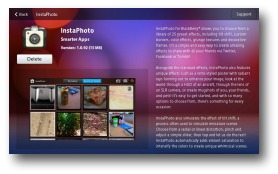
Review - InstaPhoto for BlackBerry
It's not often you find an app on BlackBerry that works well on one device, and then you get to download it for another, without paying again.
For that InstaPhoto should be applauded.
I intially bought the app on my PlayBook; it's a great way to add pre-defined filters to photographs, and then post them directly to Facebook or Twitter; or just save them locally.
I then thought this would be really ideal on the Torch, and went looking. However, it wasn't until I saw an article that said it would be free if already owned, that I dived in and downloaded.
For that InstaPhoto should be applauded.
I intially bought the app on my PlayBook; it's a great way to add pre-defined filters to photographs, and then post them directly to Facebook or Twitter; or just save them locally.
I then thought this would be really ideal on the Torch, and went looking. However, it wasn't until I saw an article that said it would be free if already owned, that I dived in and downloaded.- Easy to get started, simply choose a pre-existing photo or take one with the camera.
- Camera integration runs directly within app, allowing you to take a photo and start instantly!
- Images save to a custom gallery folder, and are featured when you load the app.
- Large preview images allow you to see an effect clearly before making a selection.
- Simple controls with stunning pre-set effects, it’s easy for anyone to use with just a tap of the finger!
- Unique effects creating interesting themes for your photos; periscope, mugshots, torn, postcards and many more!
The only negative, from my perspective, is that all photos are cropped to a square. It's a shame the original photo can't be used, or the cropping work a little more freely. Maybe this is something they can include in a future release.
All in all, this is one app that really helps add some creativity to your photos; and the cropping comment aside, is well worth the download; especially as you can have two copies (PlayBook and handset) for the price of one.
Thursday, July 28, 2011
Review - BBM: Social Just Got Integrated
"Did you know that seventy percent of BlackBerry® Messenger (BBM™) users use BBM every day to communicate with friends, family and colleagues?"Well, now, social just got more integrated, as the next version of BlackBerry Messenger has been released.
For those who don't know, BlackBerry Messenger (BBM) is the
instant messenger application for communicating between BlackBerry
handsets. I say 'communicating' because
it is more than chat. It's possible to
send files, photos, voice recordings and video and it doesn't cost anymore than
the data plan you already have.
I've written about it before, and even with the introduction
of other cross-platform services, such as WhatsApp, it is a major selling point
for BlackBerry. Even Apple have tried to
emulate it, with iMessenger.
So, what's new? What have RIM (the makers of BlackBerry)
come up with now?
BBM6... A bright, shiny new, version that integrates with other
applications.
For example, you could be playing a game online, and use BBM to invite others and chat about the game.
Or, using Foursquare (the location-based, notification, service) I can let my BBM contacts know where I am, even if they don't use it. What's more, if they then click on the link within my status update, they can download the app for themselves.
Sports fan? Using ScoreMobile (a great free app that tracks major sporting events; including the English Premier League) you can chat with friends about the game, in the application. Clever eh?
It's a whole new way to interact, and share information, the apps you love to use and get more involved.
If you have a BlackBerry, then head over to App World and download the latest version of BBM.
For example, you could be playing a game online, and use BBM to invite others and chat about the game.
Or, using Foursquare (the location-based, notification, service) I can let my BBM contacts know where I am, even if they don't use it. What's more, if they then click on the link within my status update, they can download the app for themselves.
Sports fan? Using ScoreMobile (a great free app that tracks major sporting events; including the English Premier League) you can chat with friends about the game, in the application. Clever eh?
It's a whole new way to interact, and share information, the apps you love to use and get more involved.
If you have a BlackBerry, then head over to App World and download the latest version of BBM.
Friday, July 15, 2011
Hello Google+ - - - Goodbye Facebook!!
Recently heralded with great excitement and enthusiasm, this new social networking site from the famous search giant is in it's infancy; with an incredible 10,000,000 (yes, that's 10 million) users.Amazing, since it hasn't even been officially released to the masses!!
I was itching for an invite to 'have a look' and a Twitter friend kindly obliged.
It's taken some getting used to.
What am I saying - it's taking some getting used to; but it dawned on me the other morning that I didn't go straight to facebook, to see what's happening. My first port of call was Google+.
Circles
One of the big benefits are in what Google has called "Circles". The ability to create what are, essentially, lists of different people, so it's possible to target updates, comments and discussions, to relevant parties.
It's clear, crisp and fresh.
For example, I have Circles for my Family, Real Life Friends, my Twitter Friends and Work colleagues. You could have Circles of many different categories, and you can have people across multiple Circles. It's so easy to drag and drop names around. I'm still 'playing' with getting the right people in the right place...
Conversations are at the heart of Google+, but one huge benefit is the control you have over who sees what. Now that you have Circles, you can have a one-to-one chat with someone, include more people in a discussion; or throw it open to the world.
Oh - and if you have an Android handset, by all accounts, the Google+ app is excellent. I can't vouch for it. However the mobile version of the site, on iPhone and iPad, will leave users wanting; as with BlackBerry (although my PlayBook does manage very well with the full, desktop version).
Hangouts
Instant messaging is available with integration to Google Chat; and with Google Hangouts, you can also video chat with up to 10 other people at at time - great for families, friends, and even businesses for video conferencing.
Photos
Finally - the ability to add photos to your online album, and share them with certain people.
Like I mentioned earlier, on Google+ you can share what you want, with who you want; so if you only want certain people to see your photos of a night out - you have the control.
Whether publicly, a group of people, or just one person. The choice is yours.
After the video, you can read about my new 'experiment'.
The Experiment
So; from today, and for a trial period (although, who knows, it could become permanent) I will be leaving the facebook world behind me!
I say this with a few caveats:
- My Blog and I will still be published on Facebook- so you can still get your dose of my thoughts etc; but if you haven't 'Liked' my page, this could be the last post you read.
- My Foursquare updates will continue - mainly because they are automated. And I know you like to know if I get my morning coffee!
- I will react and respond to messages - I won't ignore you.
- I won't be updating my status, and I won't be commenting (or liking) any statuses.
- I won't be chatting either - If you want to chat; come on over to Google+ (or BBM or text me!)
No-one in the house thinks I can do this!
I can and I will...
At the moment, you can join Google+ by invitation. Over the next few days you may start to receive messages that I've added you to a Circle. Don't be shy. It costs nothing to look, and you may be pleasantly surprised.
I'm also still on Twitter, so you can follow me there @doonytime
So - Goodbye facebook; or should that be à bientôt.
Labels:
apple,
bbm,
blackberry,
facebook,
google plus,
google+,
ipad,
iphone,
playbook,
twitter
Monday, July 04, 2011
Review - BlackBerry PlayBook Apps
OK.
I know I haven't had it for long, but too often the so-called pundits have complained about the lack of apps available for the new BlackBerry tablet.
So, to try to redress the balance, here are my views on a handful of the apps available:
Bluebox
I've mentioned Dropbox in a previous blog, and this is an app to access Dropbox files, on the PlayBook. It's a neat app, which allows you to download, upload, move, delete and more, your files from a central storage location. You can access Dropbox files from almost anywhere (unfortunately, it's blocked at my work!)
Instaphoto
I discovered this the other day, and it's a great app for adding filters to photos. There are 25 to choose from, anything from gothic, to the 60s, Polaroid, faded; you name it, there's a filter to add that je ne sais quois to your pictures.
GeeReader
If you use Google Reader to follow those news items you want, then this is a great addition for the PlayBook. I love getting my news on the go; and have a news reader on my phone. This is the equivalent and it works beautifully. What's more, because of the flash capability, I can open the video reports too!
Doodleblast
Couldn't resist including a game on here. The PlayBook comes pre-loaded with Need For Speed and Tetris; but this game is a tricky little teaser. You are presented with a number of obstacles and a box at the bottom of the screen. You also have a bottle of ink; with which you have to draw lines to direct the balls that fall, into the box. It's not as easy as it sounds; and each level reduces the amount of ink available. It's extremely addictive.
That's only a small selection; and as time goes on, I may well bore you with more reviews!
I know I haven't had it for long, but too often the so-called pundits have complained about the lack of apps available for the new BlackBerry tablet.
So, to try to redress the balance, here are my views on a handful of the apps available:
Bluebox
I've mentioned Dropbox in a previous blog, and this is an app to access Dropbox files, on the PlayBook. It's a neat app, which allows you to download, upload, move, delete and more, your files from a central storage location. You can access Dropbox files from almost anywhere (unfortunately, it's blocked at my work!)Instaphoto
I discovered this the other day, and it's a great app for adding filters to photos. There are 25 to choose from, anything from gothic, to the 60s, Polaroid, faded; you name it, there's a filter to add that je ne sais quois to your pictures.
GeeReader
If you use Google Reader to follow those news items you want, then this is a great addition for the PlayBook. I love getting my news on the go; and have a news reader on my phone. This is the equivalent and it works beautifully. What's more, because of the flash capability, I can open the video reports too!Doodleblast
Couldn't resist including a game on here. The PlayBook comes pre-loaded with Need For Speed and Tetris; but this game is a tricky little teaser. You are presented with a number of obstacles and a box at the bottom of the screen. You also have a bottle of ink; with which you have to draw lines to direct the balls that fall, into the box. It's not as easy as it sounds; and each level reduces the amount of ink available. It's extremely addictive.That's only a small selection; and as time goes on, I may well bore you with more reviews!
Thursday, June 30, 2011
Review - BlackBerry PlayBook
OK. I'm going to jump on the bandwagon and write a review about the BlackBerry PlayBook.
I wrote recently about how I wanted one; and so, I went out and got one. Having read all the reviews I could find, and seeing how many were quite disparaging; then getting the opportunity to actually use one; I couldn't understand the negative comments.
So, here, for what it's worth, is my personal view of the PlayBook. I have the original iPad, so will compare against that (but I know the iPad 2 offers slightly better specs).
Build and Size
The PlayBook is solid. It's half the height of the iPad (in portait) and the same width, weighing just 425g (under 1lb)
With a 7" screen, offering a resolution of 1024 x 600, it's a great size for carrying around.
There are 4 external buttons - the power switch, and media controls (start, pause and volume +/-)
I've read complaints about the power switch being too recessed. RIM must have heard, because on mine, it's flush with the body, which is ideal.
There is a headphone socket, and along the bottom, a micro USB port, a micro HDMI port and a port for a fast charger. It's not possible to expand the memory; like the iPad, it's a fixed storage volume.
Operating System
RIM went back to the drawing board when they designed this baby. Using the talents of the folks at QNX, they have designed an OS that is so fluid and intuitive, I'd be surprised if it doesn't surface on their smartphones in the not-to-distant future.
Running a dual-core 1GHz processor, with another 1Gb of RAM, this is a quick beast.
With full Adobe Flash built-in, this is a machine that shows the web they way it's meant to be seen. That's one thing that the iPad can't do; and is a major selling point.
Whilst I'm talking web, I also compared the speed of loading websites, and the PlayBook was quicker on every site I tried. A definite winner.
Since there is no 'home' button, everything is operated through the use of 'gestures'. Swiping across the screen (up, down, diagonal) brings up various context-sensitive options, keyboard and settings. The bezel (the black screen surround) is part of this, and is a clever use of the otherwise wasted space around the screen.
The fluid way the apps switch; not to mention the true multi-tasking ability, makes this a beautiful tablet to operate. The web browser allows for multiple tabs too.
Media
Offering 1080p HD video, and two high-definition cameras (3MP on the front and 5MP on the rear) the picture quality is flawless. There is no flash.
The built in media player is good; but I have to admit that the iPad has the advantage. Watching a film, the sound and picture quality is great; however, the iPad remembers where you are when you stop watching; and resumes where you left off. The PlayBook doesn't do that. It's not a big thing (and in the grand scheme is certainly not a deal-breaker!)
On the subject of sound, the PlayBook offers stereo speakers - a definite improvement on the tinny speaker on the iPad.
The initial release of the PlayBook is Wi-Fi only (3G is due later this year) and it works very well. It's possible to tether any mobile phone (via bluetooth) to get online, or use a Mi-Fi dongle outside of a Wi-Fi area.
Of major criticism has been the lack of native calendar and email applications. I thought long and hard about this, and tried the BlackBerry Bridge that RIM devised. This allows you to pair the PlayBook with your BlackBerry and use the applications on that. It's a clever idea, and it works. You can also access files on the smartphone. Once the connection is cut, the access to the apps is removed.
Cleverly, you can use this bridge to access BBM, and use the larger screen and keyboard to write messages.
Apps
The other criticism is the lack of apps. These days, the world of tablets is governed by the applications available for it. However, allow me to counter this by saying, when the iPad was released, the majority of apps were for the iPhone, and didn't scale properly on a larger screen (take facebook as an example). Over time, apps were built and Apple have managed this to great success.
No-one is pretending that BlackBerry will grow to the heady heights of the App Store; but there are apps available for the PlayBook; and with the promise of an Android player, then the number of apps will increase quickly.
There's plenty more I could write, including being able to wirelessly update the software, copy files wirelessly between the PlayBook and PC; and the fact you're not tied to an ecosystem like iTunes.
It's a beautifully designed tablet.
To all the Apple fans out there; who just want to knock something that isn't created by Mr Jobs; take a proper look at how a tablet can be all things to all men (and women).
I wrote recently about how I wanted one; and so, I went out and got one. Having read all the reviews I could find, and seeing how many were quite disparaging; then getting the opportunity to actually use one; I couldn't understand the negative comments.
So, here, for what it's worth, is my personal view of the PlayBook. I have the original iPad, so will compare against that (but I know the iPad 2 offers slightly better specs).
Build and Size
The PlayBook is solid. It's half the height of the iPad (in portait) and the same width, weighing just 425g (under 1lb)With a 7" screen, offering a resolution of 1024 x 600, it's a great size for carrying around.
There are 4 external buttons - the power switch, and media controls (start, pause and volume +/-)
I've read complaints about the power switch being too recessed. RIM must have heard, because on mine, it's flush with the body, which is ideal.
There is a headphone socket, and along the bottom, a micro USB port, a micro HDMI port and a port for a fast charger. It's not possible to expand the memory; like the iPad, it's a fixed storage volume.
Operating System
RIM went back to the drawing board when they designed this baby. Using the talents of the folks at QNX, they have designed an OS that is so fluid and intuitive, I'd be surprised if it doesn't surface on their smartphones in the not-to-distant future.
Running a dual-core 1GHz processor, with another 1Gb of RAM, this is a quick beast.
With full Adobe Flash built-in, this is a machine that shows the web they way it's meant to be seen. That's one thing that the iPad can't do; and is a major selling point.
Whilst I'm talking web, I also compared the speed of loading websites, and the PlayBook was quicker on every site I tried. A definite winner.
Since there is no 'home' button, everything is operated through the use of 'gestures'. Swiping across the screen (up, down, diagonal) brings up various context-sensitive options, keyboard and settings. The bezel (the black screen surround) is part of this, and is a clever use of the otherwise wasted space around the screen.
The fluid way the apps switch; not to mention the true multi-tasking ability, makes this a beautiful tablet to operate. The web browser allows for multiple tabs too.
Media
Offering 1080p HD video, and two high-definition cameras (3MP on the front and 5MP on the rear) the picture quality is flawless. There is no flash.
The built in media player is good; but I have to admit that the iPad has the advantage. Watching a film, the sound and picture quality is great; however, the iPad remembers where you are when you stop watching; and resumes where you left off. The PlayBook doesn't do that. It's not a big thing (and in the grand scheme is certainly not a deal-breaker!)
On the subject of sound, the PlayBook offers stereo speakers - a definite improvement on the tinny speaker on the iPad.
The initial release of the PlayBook is Wi-Fi only (3G is due later this year) and it works very well. It's possible to tether any mobile phone (via bluetooth) to get online, or use a Mi-Fi dongle outside of a Wi-Fi area.
Of major criticism has been the lack of native calendar and email applications. I thought long and hard about this, and tried the BlackBerry Bridge that RIM devised. This allows you to pair the PlayBook with your BlackBerry and use the applications on that. It's a clever idea, and it works. You can also access files on the smartphone. Once the connection is cut, the access to the apps is removed.
Cleverly, you can use this bridge to access BBM, and use the larger screen and keyboard to write messages.
Apps
The other criticism is the lack of apps. These days, the world of tablets is governed by the applications available for it. However, allow me to counter this by saying, when the iPad was released, the majority of apps were for the iPhone, and didn't scale properly on a larger screen (take facebook as an example). Over time, apps were built and Apple have managed this to great success.
No-one is pretending that BlackBerry will grow to the heady heights of the App Store; but there are apps available for the PlayBook; and with the promise of an Android player, then the number of apps will increase quickly.
There's plenty more I could write, including being able to wirelessly update the software, copy files wirelessly between the PlayBook and PC; and the fact you're not tied to an ecosystem like iTunes.
It's a beautifully designed tablet.
To all the Apple fans out there; who just want to knock something that isn't created by Mr Jobs; take a proper look at how a tablet can be all things to all men (and women).
Thursday, April 28, 2011
I Want One Of These....
The BlackBerry Playbook has just been released in the US, and is due to land here sometime around June.
Smaller than the iPad, and with Flash included, it may not have the Apps that are abundant on the Apple, but it does have the web-browsing capability. Making use of 'gestures' (the knack of swiping around the screen) to bring up menus, load apps, and switch apps, there have been quite mixed reviews from the so-called pundits.
There have been many comparisons made to the iPad, many of which I think are unfair. They are both different machines; and whilst Apple have undoubtedly got it right in many respects; it doesn't mean no-one else can. The PlayBook is smaller and faster than the iPad; and one area that nobody seems to disagree is the multi-tasking capability of the PlayBook - the ability to swap between apps.
As a tablet, it has been designed to stand-alone from the smartphones for which BlackBerry have become well-known. However, through the use of a Bridge, it's possible to link the two together, and use the larger screen of the Playbook to do email, calendar and BBM.
It should be noted that, in the US release, email and calendar functions are missing. I'm hoping they'll be included before being launched here; however, I don't see it as a big miss; especially as they are both in "the cloud" and accessed via the web.
It looks like a cracking little device; and this is the 30 second ad that RIM have just started in the States.
All I need to know is - when can I get mine.....
Smaller than the iPad, and with Flash included, it may not have the Apps that are abundant on the Apple, but it does have the web-browsing capability. Making use of 'gestures' (the knack of swiping around the screen) to bring up menus, load apps, and switch apps, there have been quite mixed reviews from the so-called pundits.
There have been many comparisons made to the iPad, many of which I think are unfair. They are both different machines; and whilst Apple have undoubtedly got it right in many respects; it doesn't mean no-one else can. The PlayBook is smaller and faster than the iPad; and one area that nobody seems to disagree is the multi-tasking capability of the PlayBook - the ability to swap between apps.
As a tablet, it has been designed to stand-alone from the smartphones for which BlackBerry have become well-known. However, through the use of a Bridge, it's possible to link the two together, and use the larger screen of the Playbook to do email, calendar and BBM.
It should be noted that, in the US release, email and calendar functions are missing. I'm hoping they'll be included before being launched here; however, I don't see it as a big miss; especially as they are both in "the cloud" and accessed via the web.
It looks like a cracking little device; and this is the 30 second ad that RIM have just started in the States.
All I need to know is - when can I get mine.....
Tuesday, April 05, 2011
Review - Amazon Kindle for BlackBerry
Reading. That old chestnut. I have written quite a few posts about books; whether the first books I read; or the physical versus electronic (e-book) book.
I have an iPad; on to which I've download the Amazon Kindle App; so I can buy books, and read them, easily from my armchair (or train seat!)In the US, they released an Amazon Kindle for BlackBerry; which on their website they claim is only available in the US. I have no idea why; as, last week, I downloaded it here.
Wow!! Now, I have my books with me all the time. Standing on the station platform, I can read my book. Not on the iPad, or even the actual book; but on my BlackBerry. The beauty is, I can sync the bookmark on one device, and pickup from the same point on another.
I admit it's not the easiest screen to read a book; it's a little on the small side; but for a quick read, it's ideal.
So, what e-book are you reading at the moment?
Monday, April 04, 2011
Review - Amazon MP3 for BlackBerry
Do you listen to music on your BlackBerry?
The media player on the Torch is not bad (it's not the iPod) but for music on the move, it beats carrying two devices around.
I listen to my music during my daily commute; and whilst I don't pump up the volume so those around can hear what I'm listening to, I do enjoy the beat, and it makes the journey swing along!
I was very pleased to see that Amazon have produced an app, allowing me to purchase music right there and then, and download it to my handset. Not only can I now listen to music, but I can buy it too.
If you're desperate to use your iPod, then you can sync the music with iTunes, and download to your media player.
Amazon always seem to do these things quite well; and their catalogue isn't bad at all. They also offer a free track; every week; so you can try something new.
So, what have I downloaded directly to my BlackBerry? The latest R.E.M. album "Collapse Into Now" which, personally, I think is great. There is some great music; from a band that goes back years.
You can get the Amazon MP3 for BlackBerry app from their App World; it's free to download, and you never need to wait til you get home again.
Tuesday, March 15, 2011
Review - BeReader For BlackBerry
How do you like your news?
On tap?
Delivered to you, so you don't need to look for it?
We live in a fast-moving society, and it's not always possible to stop. We can however, make use of the technology around us; the phone in our pocket, iPad (other tablets are available!) and laptops.
As you know by now, I love my BlackBerry. I also keeping up to date with things that interest me.
BeReader (formerly BerryReader, hence the old image!!) is a Google Reader client that allows you to read your Google Reader news on your BlackBerry, everywhere you go, even when you don't have network coverage.
BeReader stays fully synchronised to your Google Reader account. Plus, with the inline article reading and clear user interface, reading news has never been so easy and convenient.
If you use other Google Reader applications, either on your PC or tablet, they will also be kept in sync. It's darned clever stuff!
As for BeReader itself; it's easy to use; and you can also post stories to either Facebook or Twitter; sharing the news.
Other features include:
On tap?
Delivered to you, so you don't need to look for it?
We live in a fast-moving society, and it's not always possible to stop. We can however, make use of the technology around us; the phone in our pocket, iPad (other tablets are available!) and laptops.
As you know by now, I love my BlackBerry. I also keeping up to date with things that interest me.
BeReader (formerly BerryReader, hence the old image!!) is a Google Reader client that allows you to read your Google Reader news on your BlackBerry, everywhere you go, even when you don't have network coverage.BeReader stays fully synchronised to your Google Reader account. Plus, with the inline article reading and clear user interface, reading news has never been so easy and convenient.
If you use other Google Reader applications, either on your PC or tablet, they will also be kept in sync. It's darned clever stuff!
As for BeReader itself; it's easy to use; and you can also post stories to either Facebook or Twitter; sharing the news.
Other features include:
- Access your All Items, Starred Items, Shared Items, a single feed or a single folder for reading
- Automatically updates in the background - you decide the frequency
- Manage subscriptions from your handset
- Get notified when new articles are available (including custom LED colour support through BeBuzz)
- Plus lots more
Wednesday, February 23, 2011
Review - PingChat
The astute amongst you may have noticed and editorial error yesterday, as I accidentally published an article. This is the post I meant to publish, and yesterdays, should have followed it!!
With me so far? Thought not!! Enjoy anyway....
BlackBerry Messenger (BBM) has made headlines recently, as it has become one of the most popular instant message applications for mobile phones. Indeed, it's one of the reasons that RIM (the developers of BlackBerry) have had such a good time of late - and outstripped sales of the iPhone in the last quarter of 2010!!
However, BBM is only good for chatting BlackBerry to BlackBerry. What if your friends, family and colleagues are using different phones. The iPhone is prolific and Android is making huge headway into the market.
There are cross-platform (as it's known) applications that allow you to do just this; one of which is WhatsApp, and the other is a relative newcomer - PingChat.
PingChat is simple to setup, and it will search your address book, as well as Facebook and Twitter (if you let it) to find other PingChat users. They will automatically be invited to become 'buddies'.
The system allows you to chat realtime, send photos, voice notes and video. It's a simple interface, and it also allows you to have a group chat, with multiple contacts at once. The only downside to this; on the BlackBerry, is that you need to know their PingChat ID. This is silly; surely I should be able to select from my list of contacts. Hopefully, that will change.
It's not quite there with BBM. You can't add smiley faces, and the voice notes need to be pre-recorded; they can't be recorded in the app - another missing feature.
All in all - whilst they are making great strides, and without a doubt will continue to grow; for me PingChat doesn't fulfil my needs as an instant messenger. I must stress, that this is on the BlackBerry.
I have looked at the iPhone / iPod app on the iPod Touch. That doesn't have voice notes, but you can send pictures. You can also send a map with your current location. That could be useful. Unfortuately, that functionality doesn't exist on the BlackBerry, so I couldn't open the map!!
And there is the crux of the problem. Whilst basic chat is cross-platform; if you want to do more; there's still a way to go. But, don't ignore it completely; the basics are good, and when they tidy up around the edges, then this will definitely be an app to have.
Do you use cross-platform instant message applications? Which one is your favourite?
With me so far? Thought not!! Enjoy anyway....
BlackBerry Messenger (BBM) has made headlines recently, as it has become one of the most popular instant message applications for mobile phones. Indeed, it's one of the reasons that RIM (the developers of BlackBerry) have had such a good time of late - and outstripped sales of the iPhone in the last quarter of 2010!!
However, BBM is only good for chatting BlackBerry to BlackBerry. What if your friends, family and colleagues are using different phones. The iPhone is prolific and Android is making huge headway into the market.
There are cross-platform (as it's known) applications that allow you to do just this; one of which is WhatsApp, and the other is a relative newcomer - PingChat.
PingChat is simple to setup, and it will search your address book, as well as Facebook and Twitter (if you let it) to find other PingChat users. They will automatically be invited to become 'buddies'.The system allows you to chat realtime, send photos, voice notes and video. It's a simple interface, and it also allows you to have a group chat, with multiple contacts at once. The only downside to this; on the BlackBerry, is that you need to know their PingChat ID. This is silly; surely I should be able to select from my list of contacts. Hopefully, that will change.
It's not quite there with BBM. You can't add smiley faces, and the voice notes need to be pre-recorded; they can't be recorded in the app - another missing feature.
All in all - whilst they are making great strides, and without a doubt will continue to grow; for me PingChat doesn't fulfil my needs as an instant messenger. I must stress, that this is on the BlackBerry.
I have looked at the iPhone / iPod app on the iPod Touch. That doesn't have voice notes, but you can send pictures. You can also send a map with your current location. That could be useful. Unfortuately, that functionality doesn't exist on the BlackBerry, so I couldn't open the map!!
And there is the crux of the problem. Whilst basic chat is cross-platform; if you want to do more; there's still a way to go. But, don't ignore it completely; the basics are good, and when they tidy up around the edges, then this will definitely be an app to have.
Do you use cross-platform instant message applications? Which one is your favourite?
Labels:
bbm,
blackberry,
instant message,
iphone,
review
Subscribe to:
Posts (Atom)